- Questions? Email sindt.kathleen@westside66.net
- Submit work to sindt.kathleen@westside66.net
Source: https://disneyparks.disney.go.com/
Imagineering fans, get ready! If you’ve ever been one of many guests who’s visited a Disney theme park and found yourself inspired to dream, build and create, there’s a new online program you just can’t miss!
‘Imagineering in a Box’ is a free online program that brings together the diverse talents of Disney Imagineers around the world for a one-of-a-kind learning experience and is part of Disney’s commitment to helping today’s youth create the future they imagine.
The series offers 32 videos in which Imagineers share how they use a wide range of skills – from story development and conceptual design, to math, physics and engineering – to create immersive experiences. The online curriculum aims to ignite curiosity, inspire creativity, and encourage innovation in the minds of students and teachers alike, while creating fun and engaging opportunities to explore new concepts.
Modules range from a tutorial on engineering software, to an interactive exercise where learners are encouraged to gather items around them and create something new. The program’s hands-on components will allow students to relate new concepts to real-world examples to bring treasured Disney stories to life. Each activity is designed to be scalable, allowing individuals to learn on their own or in a classroom setting.
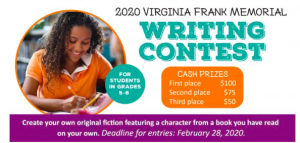
The Friends of Omaha Public Library are currently accepting submissions for the Virginia Frank Memorial Writing Contest. The contest is for students in 5-8th grade. First prize in each grade is $100.
Here is a link to the contest https://omahalibrary.org/virginia-frank-memorial-writing-contest/
The Virginia Frank Memorial Writing contest is held each year in the spring to recognize the creative writing talent of area students. This contest, sponsored by the Friends of Omaha Public Library, recognizes the top three winners from each grade. Each winner receives a cash prize and certificate, is recognized in a ceremony at the library, and has their story published on the library website. The school libraries of each winning student are also recognized with a matching cash prize.
Eligibility Requirements
Stories must be submitted with an entry form to be considered. Complete all fields either online or on a printed entry form and submit with your story.
Students must be in 5th to 8th grade and live in Douglas or Sarpy counties.
Students may be enrolled in public, private, parochial or home school.
Stories must be typed and no longer than 750 words.
Entries must be original fiction featuring a character from a book you have enjoyed and read on your own. Identify the book and author from which your character originated in the title or subtitle of your story.
Only one entry per contestant will be accepted.
The decision of the judges is final.
All entries become the property of Friends of Omaha Public Library (FOPL) and may be featured by Omaha Public Library on its website or social media.
Deadline for entries is February 28, 2020.
Prizes
First ($100), second ($75) and third place ($50)
Prizes will be awarded to the top three winners from each grade.
The school library of the winning students will be recognized with matching cash prizes.
Read the winning stories from the 2019 Virginia Frank Memorial Writing Contest
About Virginia Frank
The Virginia Frank Memorial Writing Contest began in 2003 and is named in honor of a longtime Friends of Omaha Public Library volunteer. Virginia Frank was a Central High and UNO graduate. She acquired a master’s degree from Brown University and taught English literature and creative writing at UNO for many years. Her passion for students and young people inspired everyone around her, and her enthusiasm encouraged many students to explore their creative writing talents. Frank volunteered thousands of hours with the Friends of OPL to help ensuring a bright future for our public libraries.

1. Set up your STEAM mini spark recording page:#29: Bitsbox 1-Get Started
2. Watch this intro video. Write the first line of code that you will type when creating the app food fight.
3. Copy these instructions on your recording sheet.
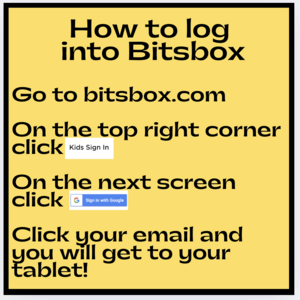
4. Click this link to get to bitsbox or go to www.bitsbox.com and follow the instructions from step 3 to get logged in.
5. Click on the food fight icon and follow the written instructions step-by-step to code the whole app. Take a screenshot of your app and add it to your recording page.
6. Now, modify your app it with your own stamp, text, and colors.
7. Take a picture of your new app and add it to your recording sheet.
8. Share your STEAM mini spark recording page with your teacher/EY coordinator.
Check out the bitsbox badge on the EY website.

The name of your day
3-5 facts about your topic
How can people celebrate this day?
Do research to find out if your day is already celebrated. If so, add that date to your project.

Check out the math contest master badge for more contest practice


2. Write each word, its part of speech, and a short definition.
geomythology caldera mastodon geothermal
4. Watch this TED ed about the origin of dragon myths.
5. Read these fact cards about dragons. Create a mini quiz to go along with the content. Make an answer key as well.
6. Share your language arts mini spark recording page and your final project with your teacher/EY coordinator.
You can use parts of this mini spark as tasks on the Dragon Tales Badge at the EY website.

 Coordinate Geometry is one of my favorite areas of math. There’s just something about getting a sheet of ordered pairs and carefully plotting them on graph paper…connecting the dots to reveal a picture. If that’s your sort of thing too, check out Option 3 below. Happy plotting!
1. Set up your math mini spark recording page:#55: Coordinate Geometry
2. Learn the basics of coordinate geometry by watching this video. Take picture notes on your recording sheet.
3. Read about the inventor of coordinate plane geometry, Rene Descartes.
4. This video gives a musical explanation of his accomplishments. Put together a note page about him.
5. Print out (or have your teacher print out) this project. Plot the ordered pairs on the graph paper and reveal a spooky surprise! Take a picture of your completed drawing and send it to the EY Coordinator at your building.
6. Create your own coordinate plane art. Plot the points and connect them with the colored lines. Take a picture after you have practiced for at least 10 minutes.
7. Share your math mini spark recording page with your teacher/EY coordinator.

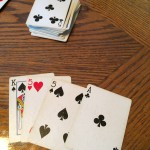 When you have a pair of the same card, you earn 2 points. The pair could be in your hand, or one of your cards could be paired with the card that is face up on the deck. If you have 3-of-a-kind, that is worth 6 points. In the picture above, there are two 5’s in the hand and one 5 face up on the deck. Not only does that make 15, but it is also 3-of-a-kind which earns you 6 points.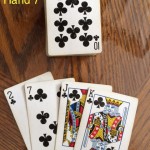
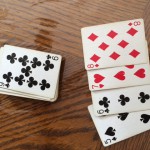
6. The pictures below show several cribbage hands. See if you can add up the points correctly! Record the “hand #” and an explanation of the total points.
7. What are other ways you can earn points in a cribbage game? Do a little research and to find some.
8. Share your math mini spark recording page with your teacher/EY coordinator.
Check out the Cribbage Master Badge from the EY website.
