In this STEAM mini spark you will learn how to sign in to Bitsbox and how to code your own app, food fight.
Spark your thinking!
1. Set up your STEAM mini spark recording page:#29: Bitsbox 1-Get Started
2. Watch this intro video. Write the first line of code that you will type when creating the app food fight.
3. Copy these instructions on your recording sheet.
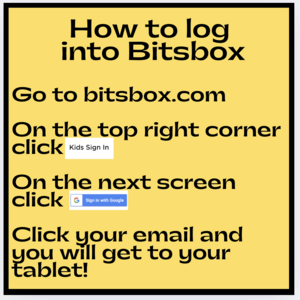
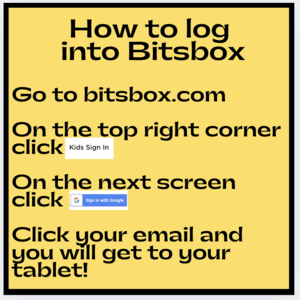
4. Click this link to get to bitsbox or go to www.bitsbox.com and follow the instructions from step 3 to get logged in.
5. Click on the food fight icon and follow the written instructions step-by-step to code the whole app. Take a screenshot of your app and add it to your recording page.
6. Now, modify your app it with your own stamp, text, and colors.
7. Take a picture of your new app and add it to your recording sheet.
8. Share your STEAM mini spark recording page with your teacher/EY coordinator.
Check out the bitsbox badge on the EY website.
 and then add in the 4 digit code on the coding card.
 National STEAM day is celebrated on November 8, but you can create STEAM all year long! Check out this rocket launcher experiment that you can do to celebrate the national day dedicated to Science, Technology, Engineering, Art, and Math.



 Know what you want to write but aren’t sure where to start? These sentence prompts will help. Remember these 6 openings and you can write anything you want
 How are smartphones built? What materials are used? Complete this math mini spark and learn more.

